4/11/2012

Update 1 for FBDataGuard 2.7

Update 1 for FBDataGuard 2.7 is available for download (archive for LinuxUser Guide). It replaces the previous version of FBDataGuard 2.7. This update contains important stability improvements (for environments with more than 200 concurrent users) and several bugfixes. 

Please upgrade your FBDataGuard 2.7 installations as soon as possible. This is a minor upgrade, so instead of full reinstallation you can stop FBDataGuard 2.7 service, replace dataguard.jar (from new dataguard27.zip) and start it again. 

Do not hesitate to ask any questions: support@ib-aid.com.

1/20/2012

DBInfo - new IBSurgeon's free product


IBSurgeon DBInfo is designed to visualize internal structure's statistics, so administrators or developers can view how much data, index, blob or other kind of information your Firebird or InterBase database stores. 


Frequiently Asked Questions

1. What is the purpose of DBInfo?


This tool allows you to
  • view how much data, index, blob or other kind of information your InterBase or Firebird database store
  • detect some database corruptions
  • look at database page size, overall file size, database format
  • have some fun watching dynamically changing % indicators.

2. What InterBase and Firebird versions are supported?


Any from InterBase 4.0 to the latest InterBase and Firebird versions. DBInfo supports the following database formats:
  • 8.x - InterBase 4.x
  • 9.x - InterBase 5.x
  • 10.0 - InterBase 6.x, Firebird 1.0
  • 10.1 - Firebird 1.5.x
  • 11.x - InterBase 7.0/7.1/7.5
  • 11.x - Firebird 2.0/2.1/2.5
  • 11.x - Firebird 2.x
  • 12.x - InterBase 2007
  • 13.x - InterBase 2009
  • 15.x - InterBase XE

3. Do I need to have InterBase or Firebird server running?


No. DBInfo can check database file by itself, without server, and it does not need client library also.

4. Can I check for database contents on remote server?


A. Yes and no. Since DBInfo opens database file by itself, i.e. use direct access to database, you can check for database contents of database on remote server only if this database file is being shared on network.

5. May I use DBInfo if my database is on Linux (or other Unix)?


No, DBInfo is a Windows Win32 tool, so you may only check database files that can be accessed as files from Windows - locally or at shared folders.

6. Can DBInfo corrupt my database?


Never. DBInfo only reads the database file, and never writes to it. The open mode of the database file is read-only in any case.

7. May I check database contents while InterBase or Firebird is working with it?


Yes. DBInfo can open the database file even when InterBase or Firebird works with it. But, since reading the whole database file affects disk performance, be sure that at the moment your database is not at high load by applications. 
Also, if you will check the database when the database is being modified by InterBase or Firebird, DBInfo may show warning that database is corrupted, which may be wrong.

8. What is the purpose of the option "Do not use Windows file cache"?


DBInfo can scan database file with two modes - using Windows cache or not using it. Usually when you copy file on Windows, it goes to the file cache. And, file cache is being allocated from physical memory. So, the bigger is file, the more amount of file cache is used by Windows. This can cause applications and other data to being moved to virtual memory, and slowdown computer performance. 
For example, for database files larger than 500mb you could notice contiguous slowdown of DBInfo while scanning database file. Thus, we decided to turn off using cache in DBInfo by default. This allows to scan 1-10-100 gb databases without performance loss for DBInfo and operating system itself.

9. Why percentage of blob pages is marked by that color?


The colors is used to paint percentage bars does not have any meanings, except for bad pages found that is marked as red. This is the only case when we pays your attention to the damaged pages found in database.

10. What I can do if DBInfo found that my database is corrupted?


The better way is to immediately check the database by gfix and IBFirstAid Diagnostitian, and send full log to support@ib-aid.com. We will be able to help with Database Repair Services or you can buy gull version of FirstAID.

11. What if I want to see how much space is taken for each table and index in database?


In this case we suggest you to use our IBAnalyst tool, that not only can show you detailed information about your database, but also can give some notes and suggestions about performance optimizations


1/16/2012

IBSurgeon Log Viewer: new free product

IBSurgeon Log Viewer is designed to facilitate viewing and analyzing long Firebird and InterBase logs. Many Firebird and Interbase developers and administrators do not pay enough attention to the contents of firebird.log (interbase.log), though there is a lot of useful information, which can help to find and resolve various issues with Firebird/InterBase databases. 

Originally Log Viewer was IBSurgeon's internal application, which helped to quickly navigate through very long Firebird and InterBase logs, and in version 2.0 it became mature enough to be released for the community. 
Download free version 

Install it and open server’s log (usually it's in C:\Program Files\Firebird\Firebird_n_n\ folder). There are also descriptions for log entries shipped with IBSurgeon Log Viewer:


Feel free to contact IBSurgeon Support (support@ib-aid.com) if you see suspicious messages in your logs. Don't forget to attach log to the message!

10/04/2011

Firebird Conference 2011: Luxembourg, November 25-26

The Firebird Project invites all Firebird users and developers to participate in the Firebird Conference 2011, hich will take place in Luxembourg, November 25-26, 2011.

IBSurgeon is a sponsor of Firebird Conference 2011, and we recommend all our customers to go there.


The Firebird Conference 2011 will be devoted to a variety of important topics: Firebird SQL language improvements, performance, optimization, database protection and recovery, and many others.

A number of presentations will be done by the Firebird Core team, which will ensure access to information at the best technical levels. The Firebird Conference 2011 will be a place to improve your Firebird development skills and give a chance to ask questions directly to Firebird Core team.


Firebird Core Team will be represented by Dmitry Yemanov, Vlad Khorsun, Alex Peshkoff, Philippe Makowski, etc. There are also will be speakers from IBSurgeon and other Firebird-related companies.

More information: www.firebirdsql.org/en/firebird-conference-2011/

9/30/2011

Firebird 2.5.1 (sub-release) is available

Firebird Project is happy to announce general availability of Firebird 2.5.1 - a minor release of the award-winning relational database management system. This sub-release introduces several bug fixes and many important improvements  - for example, performance improvements during a database restore, the ability to write to global temporary tables in read-only databases, etc. 
For the full list of changes please refer to the Release Notes, Chapter 2 "New in Firebird 2.5". 
Firebird 2.5.1 has 100% compatible on-disk structure with Firebird 2.5.0, so it is recommended to migrate to 2.5.1 as soon as possible. To download Firebird 2.5.1, please visit the download section at the official web-site: http://firebirdsql.org/en/firebird-2-5-1/

8/25/2011

Tip for Sweep

As you probably know, manual sweep (by invoking gfix -sweep) is the important part of Firebird database maintenance (especially for big databases). Unfortunately, there are few people who understand the internals of sweep process. In this post we will not explain the magic of sweep, because it requires long and detailed explanation, instead of this we will provide you with the simple method to check that sweep was completed successfully and fulfilled its task.
After running  gfix -sweep you need to run any Firebird client (like isql.exe) and commit at least one transaction - this is necessary to move other transactions' markers after sweep.
Then run gstat -h and check its output: all transaction markers should be aligned (i.e., with minimal gap):

        Oldest transaction      16702
        Oldest active           16703
        Oldest snapshot         16703
        Next transaction        16704
If you see that gap is more than several transactions, it means that sweep did not remove all possible garbage (and in this case you can see gap of hundreds/thousands transactions). Unfortunately, sweep does not produce any errors or messages in firebird.log, so it's hard to determine the reason of failure.
Also, the big gap is an obvious alert to check database statistics (produced by gstat -r, visualized by IBAnalyst).
The most often reason why sweep does not clear all record versions is long-running writeable transaction (and this is the most often reason why automatic sweep does not work well), but there are other unpleasant options, like database corruption.
If you are sure that there were no connected users during sweep, or you saw that sweep finished unusually quickly for the big database (like several second for database 5+Gb in size), consider it as an alert, and run validation (gfix -v -full) as soon as possible.

Disadvantage of such approach (in terms of recognizing problem in system area of Firebird with failed sweep) is that sweep usually scheduled to run once per day, and it requires explicit attention of administrator, because only indirect signs appear. To monitor database health around the clock we are using our FBDataGuard tool - it check the same metadata that sweep touches during sweeping, and it sends alert immediately if something is wrong.


8/23/2011

You DON'T need CPUAffinity, nBackup, shadow and multifile databases


Right now at www.firebirdnew.org you can see the survey about Firebird features in production environment.
Some answers look like dangerous signals, especially for those who run big Firebird databases.


So, what's wrong with these answers?
1. CPUAffinity. CPUAffinity can be used to bind Firebird SuperServer to some particular CPU/core. At present we have plenty of cores even at desktop workstations, so there is no reason to use SuperServer and limit Firebird to the only CPU - use SuperClassic or Classic architectures to run Firebird at full throttle. 


2.  NBackup. In IBSurgeon we do not recommend our clients to use NBackup without external monitoring and as the only way of backup. NBackup makes the straight copy of database on page level  - it's fast, but, unlike the gbak, it does not check pages' contents. If you use only NBackup and does not perform necessary database maintenance (at least regular sweep, combined with transaction markers monitoring), and someday your database became corrupted (due to RAM problem or abnormal shutdown, for example) , NBackup will continue to make (and overwrite) "backups".  Another danger is "frozen: delta-file, when database are not unlocked correctly, and all changes are written to delta-file, and cannot be merged due to delta file problem.  To use nbackup strengths and avoid pitfalls, we setup special backup scheme for our clients.


3. Shadow is completely useless in modern production environments. It provides protection from the only type of corruption - occasional critical crash of HDD (assuming that shadow is configured correctly, with 2 separate HDDs).   Use RAID5 (or RAID10) instead - it will be much faster and more convenient for maintenance.


4. Multifile database. There is no actual reason to use multi-file database at present. With multi-file it will be impossible to do NBackup, database files will be tied to its locations, and it will give no advantage at all. Often multi-file databases are being implemented to perform copying of database to DVD, but you need to switch off Firebird during this operation.

Summary
Of course, the title of this post is a provocation, and sometimes administrator need to use CPUAffinity, nbackup and other features (not shadow!), in order to achieve some specific result, but it should be done correctly and with full understanding of steps to be done. NBackup is the most useful tool, which is very often understimated both in terms of strengths and possible problems with it.

More information:
"Firebird's Big Database" presentation at slideshare:


7/17/2011

Firebird: how to find SQL queries which use bad index?

In the first part of our optimization story ("How to ruin Firebird performance...") we mentioned that indices should be analyzed before dropping, even if they appeared to be very bad in IBAnalyst in terms of garbage and number of unique values.
In essence, we need to log all queries used in applications, get their execution plans and check, how indices are used. 
For this we need to log all SQL traffic between applications and Firebird database. 
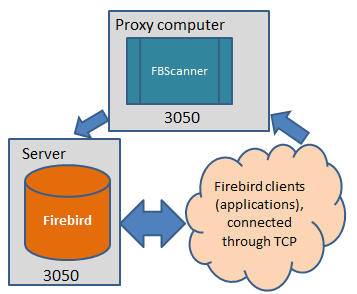
There are 2 ways to do it in Firebird 2.5 and later: FBScanner and Trace API, and the only way in early versions of Firebird: FBScanner.
FBScanner (Firebird Scanner) is a tool that can monitor and view all traffic between Firebird and InterBase servers and their client applications.
FBScanner can log all SQL traffic to text files and external Firebird database, it includes FBScanner LogAnalyzer module to analyze SQL performance.
Why not use Trace API?
For Firebird 2.5 users using TraceAPI could be good solution, but for high-load system TraceAPI can add too much load to Firebird. FBScanner add only 5-10% overhead to general operations and, moreover, it can be installed on separate [debug] server, so users and applications will not see any difference.
Also, as you can see below, FBScanner offers convenient user interface to analyze plans and queries.

FBScanner stores all information into the single table. It uses self-links to reduce the amount of stored information and it makes raw log hard to read and understand.
To facilitate log analysis we have created new module in FBScanner 3.0 - LogAnalyzer.

At first start LogAnalyzer will create necessary indices, it can take several minutes.
After that LogAnalyzer will show the last available day in the log at the “Server Load” tab:


“Server Load” tab shows how many SQL queries were run per minute, and how much time they took to execute. Effectively it shows server load, i.e., number of queries and their execution times.
Zoom in (button in the top left corner of the tab “Server load”), drag graph by holding right-button of the mouse and select the peak you are interested to investigate – click right-button to show popup-menu

It will show you tab “All statements”, where you can browse SQL queries


Select any query to see its text and, if plan logging feature is enabled, its plan.
To follow the execution flow, you can right-click on the query and look for connection and transactions for this query

LogAnalyzer marks bold queries in the same transaction:

You can sort queries and, for example, find query with the longest execution time:


To know more about this query - double-click on it and see more details
More information about FBScanner is available in "FBScanner User Guide".

After fixing plans we can delete bad indices. But good question - how to assure that new plans will act normally in production environment?
See answer for this question in the next article.

7/10/2011

How to ruin Firebird performance with bad indices

Abstract

This short article shows by example how bad index can affect Firebird database performance.

Test database
Imagine you have simple Firebird database:
CREATE DATABASE “E:\TESTFB25INDEX.FDB” USER “SYSDBA” PASSWORD “masterkey”;
CREATE TABLE TABLEIND1 (
    I1            INTEGER NOT NULL PRIMARY KEY,
    NAME          VARCHAR(250),
    MALEORFEMALE  SMALLINT
);
CREATE GENERATOR G1;
SET TERM ^ ;

create or alter procedure INS1MLN
returns (
    INSERTED_CNT integer)
as
BEGIN
inserted_cnt = 0;
WHILE (inserted_cnt <1000000) DO
BEGIN
 Insert into tableind1(i1, name, maleorfemale) values(gen_id(g1,1), 'TEST name', (:inserted_cnt - (:inserted_cnt/2)*2));
 inserted_cnt=inserted_cnt+1;
END
suspend;
END^
SET TERM ; ^
GRANT INSERT ON TABLEIND1 TO PROCEDURE INS1MLN;
GRANT EXECUTE ON PROCEDURE INS1MLN TO SYSDBA;
COMMIT;

For some reason you need:
·         insert 1 million records
·         update all these records
·         delete all records
·         run SELECT count(*) from this database.

To perform it, we can use the following script (to run it immediately after database creation script) :

set stat on;  /*show statistics*/
select * from ins1mln;
update tableind1 SET MALEORFEMALE = 3;
delete from tableind1;
select count(*) from tableind1;

and store result for future analysis.

Then we will create database with the same structure -  but add index for MALEORFEMAIL column
CREATE INDEX TABLEIND1_IDX1 ON TABLEIND1 (MALEORFEMALE);
As you can see, we insert to this column only 0 or 1 integer values.
Then we repeat the script with this index and compare results.

Results are in the following table:
Without index for MALEORFEMAIL
With index for MALEORFEMALE
SQL> set stat on; /*show statistics*/
SQL> select * from ins1mln;

INSERTED_CNT
============
     1000000

Current memory = 10487216
Delta memory = 80560
Max memory = 12569996
Elapsed time= 13.33 sec
Buffers = 2048
Reads = 0
Writes 18756
Fetches = 7833503
SQL> update tableind1 SET MALEORFEMALE = 3;
Current memory = 76551788
Delta memory = 66064572
Max memory = 111442520
Elapsed time= 15.04 sec
Buffers = 2048
Reads = 16166
Writes 15852
Fetches = 6032307
SQL> delete from tableind1;
Current memory = 76550240
Delta memory = -1548
Max memory = 111442520
Elapsed time= 3.27 sec
Buffers = 2048
Reads = 16147
Writes 16006
Fetches = 5032277
SQL> select count(*) from tableind1;

       COUNT
============
           0

Current memory = 76552064
Delta memory = 1824
Max memory = 111442520
Elapsed time= 1.35 sec
Buffers = 2048
Reads = 16021
Writes 1791
Fetches = 2032278
SQL> set stat on; /*show statistics*/
SQL> select * from ins1mln;

INSERTED_CNT
============
     1000000

Current memory = 10484140
Delta memory = 75524
Max memory = 12569996
Elapsed time= 23.94 sec
Buffers = 2048
Reads = 1
Writes 23942
Fetches = 11459599
SQL> update tableind1 SET MALEORFEMALE = 3;
Current memory = 76548712
Delta memory = 66064572
Max memory = 111439444
Elapsed time= 29.30 sec
Buffers = 2048
Reads = 16167
Writes 19492
Fetches = 10035948
SQL> delete from tableind1;
Current memory = 76547164
Delta memory = -1548
Max memory = 111439444
Elapsed time= 3.41 sec
Buffers = 2048
Reads = 16147
Writes 15967
Fetches = 5032277
SQL> select count(*) from tableind1;

       COUNT
============
           0

Current memory = 76548988
Delta memory = 1824
Max memory = 111439444
Elapsed time= 0.69 sec
Buffers = 2048
Reads = 16021
Writes 1901
Fetches = 2032278

So, bad index decreases performance by approximately 2 times while inserting or updating. Also we can see that non-optimal index greatly increases number of writes and record fetches.

Let’s get statistics for this sample database (with bad index for MALEORFEMALE) and try to find some details.
To gather statistics, we run the following command:
gstat -r e:\testfb25index.fdb > e:\teststat.txt

TABLEIND1 table and indices statistics section looks intriguing, but what useful information it gives to us?  
TABLEIND1 (128)
    Primary pointer page: 166, Index root page: 167
    Average record length: 0.00, total records: 1000000
    Average version length: 27.00, total versions: 1000000, max versions: 1
    Data pages: 16130, data page slots: 16130, average fill: 93%
    Fill distribution:
       0 - 19% = 1
      20 - 39% = 0
      40 - 59% = 0
      60 - 79% = 0
      80 - 99% = 16129

    Index RDB$PRIMARY1 (0)
      Depth: 3, leaf buckets: 1463, nodes: 1000000
      Average data length: 1.00, total dup: 0, max dup: 0
      Fill distribution:
           0 - 19% = 0
          20 - 39% = 0
          40 - 59% = 0
          60 - 79% = 1
          80 - 99% = 1462

    Index TABLEIND1_IDX1 (1)
      Depth: 3, leaf buckets: 2873, nodes: 2000000
      Average data length: 0.00, total dup: 1999997, max dup: 999999
      Fill distribution:
           0 - 19% = 0
          20 - 39% = 1
          40 - 59% = 1056
          60 - 79% = 0
          80 - 99% = 1816

To understand the meaning of shown numbers and percentage values, we can use IBAnalyst tool, which offers visual interpretation of database statistics:

By clicking Reports/View recommendations we can find the appropriate explanation for this index:
Bad indices count: 1.
By `bad` we name indices with many duplicate keys (90% of all keys)
and big groups of equal keys (30% of all keys). Big groups of equal
keys slowdown garbage collection - MaxEquals here is % of max groups
of keys having equal values. Index search for such an index is not
efficient. You can drop such indices (if they are not on FK
constraints).

Index          ( Relation)  Duplicates  MaxEquals
TABLEIND1_IDX1 (TABLEIND1) :   100%,      50%

In production databases often we can see many bad indices, which can greatly affect database performance. In this example we can see table with 13 millions of records which have 7 bad indices, which are (most likely) useless and greatly decrease Firebird performance.


Usually the first move of developer is to drop these bad indices. On other hand, it’s possible that bad index was used in some particular SQL query, which required specific combination of indices (including bad one) in order to run fast enough.
Firebird SQL optimizer has complex rules, and it often happens that dropping of bad index can lead to significant performance degradation in some queries.
Certainly, these SQL queries should be rewritten to use more optimal execution plan without bad index, but there is a still a problem: how to find SQL queries which use bad index? 
The answer is in the next episode of our Optimization series of articles.

11/30/2010

Firebird Case Studies Catalog

To support Firebird Project and MindTheBird!, we'll re-print their message here:

Hello All Firebirders!

Today we start very important activity  - building Firebird Case Studies catalog.


WHAT IS CASE STUDY?

Case study is an example of real-world implementation of certain product. Case study should be very specific and describe
1) technical details (database size, # of users, transactions load),
2) type of business (ERP, hospital automations, CD catalogs, web-sites
examples, etc) and
3) business value – license costs economy, performance increasing, etc.


WHY FIREBIRD PROJECT NEEDS YOUR CASE STUDIES?

People are looking for templates in all areas of the life.
There are hundreds of “sitting ducks” Firebird deployments, which are very good in all terms – database sizes, # of users, high ROI for business, etc, etc.


We need to go for them and build the collection of case studies at www.firebirdsql.org web-site to clearly demonstrate to the world the actual value of Firebird deployments.


This is very important for Firebird Project future development and its recognition in IT world. Let's expose the power of Firebird to everybody, and for this we need participation of each Firebird developer!


WHO CAN PARTICIPATE IN FIREBIRD CASE STUDY CATALOG?

Yes, you can!
Firebird needs case studies and stories of all types - so regardless of what software you create - for bakery automation or to navigate space ships - create and submit your case study.
Every EXE-file or web-site which uses Firebird is important for Firebird project, if it does useful things. It will take only 1-2 hours and it will help Firebird a lot!


HOW TO CREATE FIREBIRD CASE STUDY?

Download Firebird Case Study Guide and Template www.mindthebird.com/docs/firebird_case_study_template.doc

You will go through several steps that are described in this template and then fill out the necessary text sections, attach appropriate graphics and write several quotes.  We estimate time to create case
study in 1-1.5 hour.


Only case studies in English are accepted, but if you have Case Study in several languages, it will be good addition.


If you have several good examples of Firebird usage, create several Case Studies for each.

The result will be submitted to Firebird Project Marketing and a professional designer will create the final case study document in PDF format.


PRIZES AND BENEFITS

Every submitted case study will be considered by MindTheBird Team and Firebird Project Marketing and, if it will be considered as a good and complete description of the real-world project or existing packaged
software, it will be included into Firebird Case Studies Catalog at firebirdsql.org, which will run in Q1 of 2011.
First 20 Case Studies will have prizes from the list www.mindthebird.com/benefits.html and, of course, they will be specially listed at minthebird.com and, later, at firebirdsql.org.


ANY QUESTIONS?

Send your questions to case(at)mindthebird.com